 AI-generated
AI image prompt
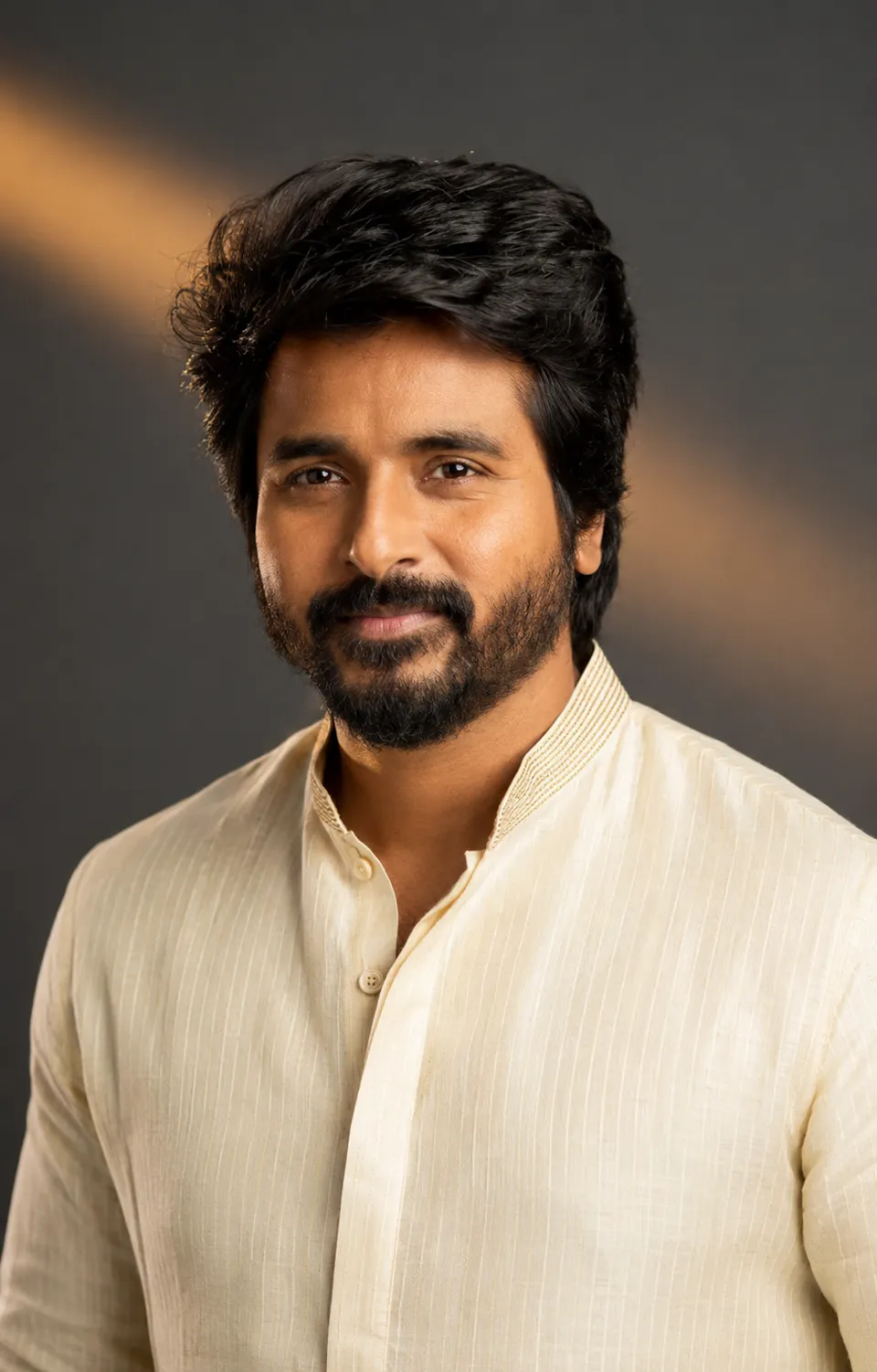
Warm Ivory Kurta Portrait
A studio portrait featuring a man in a warm ivory kurta, captured with an artistic touch that emphasizes his features and expression. The soft amber light contrasts beautifully against a storm-grey backdrop, creating a comfortable yet sophisticated mood.
Studio portrait, vertical 4:5, chest-up. Use the man from the reference photo — carry over his exact facial features: the same face shape, eye shape and spacing, eyebrows, nose, lips, jawline, hairline, beard pattern and skin tone — while his expression is free to change from the reference. He wears a rich ivory kurta with a fine self-stripe dobby weave and a hint of muted gold thread at the collar band, top button open; his hands stay relaxed and out of the frame below the crop. The backdrop is a storm-grey seamless with one warm amber streak of light sweeping diagonally across it behind his head. His one expression: a soft self-assured half-smile — lips barely curved, eyes warm and steady on the lens. Discard the reference photo's lighting entirely: the amber streak belongs to the backdrop alone — his face is genuinely lit by a warm-gelled octabox just right of camera, so the camera-right side of his face carries the key while a soft shadow falls along the camera-left cheek; his skin picks up a gentle golden warmth from the gelled key with a whisper of cool grey spill from the backdrop in the shadow, the exposure never exceeds what that single warm source could give, and one warm-toned catchlight sits in each eye. Ultra-realistic 8K-level detail: pores, beard stubble, stray flyaways glowing faintly where they cross the streak, the kurta's weave crisp, subtle film grain, his head sized naturally against his shoulders — head and body in true natural proportion, exactly as a real camera would capture him. A photograph, never a render. Color story: storm grey, ivory, muted gold.
This image was generated with AI.
About this look
Lighting plays a crucial role in this meticulously crafted portrait. The use of a warm-gelled octabox to illuminate the subject creates a lively golden warmth on his skin, while the storm-grey background adds a layer of depth. This duality enhances the man’s self-assured half-smile, bringing a sense of intimacy and warmth to the overall composition. Ultra-realistic details, such as the textures of the kurta and the delicate nuances of the subject's facial features, help draw the viewer's attention in a stunning manner.
This portrait suits occasions like formal events or cultural gatherings where one might want to convey elegance and confidence. It’s ideal for personal branding or social media profiles, where a polished image can make a strong impact. The harmonious color palette makes it a versatile choice for various contexts, providing opportunities to showcase both the attire and the subject's character in a refined manner.
How to use this prompt
Provide a reference photo for facial features, ensuring it captures the desired expressions. The prompt requires a specific body posture, with hands out of frame, and a warm lighting setup. A successful output will feature a natural proportionate head size against the shoulders and include the mentioned color story. If lighting appears off, adjusting the intensity of the warm light source may help achieve the intended effect.
Tips to customize it
- adjust the lighting angle for desired shadows
- experiment with the kurta's pattern emphasising details
- fine-tune the backdrop color for contrast
- alter the expression for different moods
More like this
Prompt Deck
Free on Google Play
Take the whole deck with you
Browse thousands of AI image prompts, customise them with your own details, and create — all from the Prompt Deck app.
- Tap to customise & copy
- Save your favourites
- Fresh prompts daily