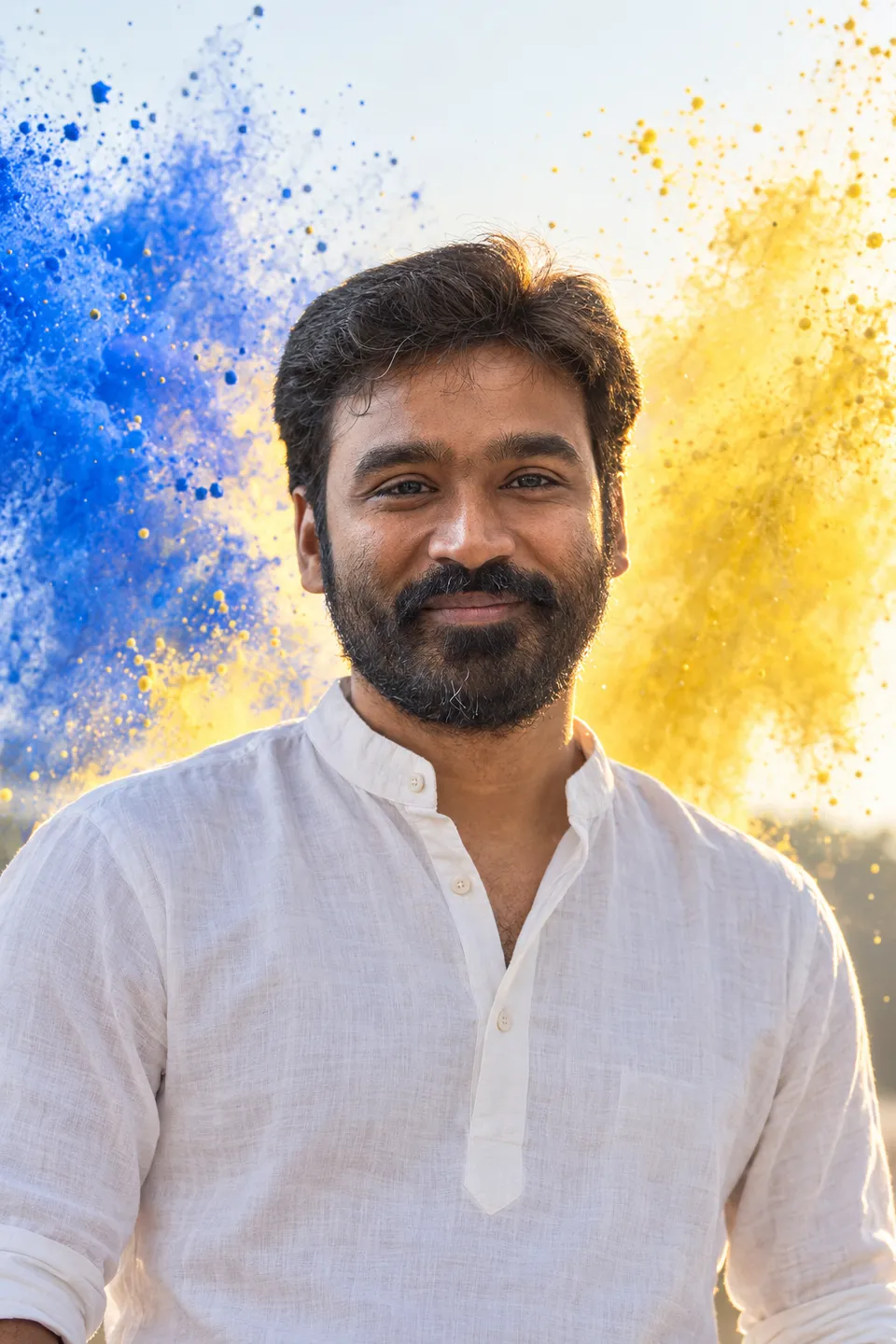
 AI-generated
AI image prompt
Vibrant Powder Burst Portrait
In this vibrant portrait, a man dressed in a white kurta stands confidently against a brilliant backdrop of cobalt and yellow powder clouds. The backlighting captures the playful elements of the powder, creating an ethereal glow while keeping the subject's face perfectly clean and vivid.
FACE MATCH FIRST: the exact man in the attached photo - same hairline, brows, eye shape and spacing, nose, lips, jaw, skin tone, same facial hair as the reference. Never beautify or reshape the face.

IDEA: a burst of dry colour powder thrown into the air BEHIND the subject, hanging as a bright cloud in low sun, backlit so the grains glow.

Waist-up, facing the lens, a white kurta. A cobalt and yellow powder cloud bursts behind him against a pale sky. A broad open grin, both eyes open.

GUARD: every grain of powder stays behind and beside the subject - none on the face, none in the eyes, no dusting on the skin. The face stays clean and correctly exposed, keyed frontally and brightest with clear catchlights, the powder cloud a step under the skin.

Real photograph, high resolution, true skin texture with visible pores, never airbrushed or plastic. Clean edges, no artefacts, no duplicated features. No lettering anywhere.

CHECK: the face must match the reference exactly.
This image was generated with AI.
About this look
The photograph captures a joyful waist-up portrait of a man with a broad grin, set against a striking burst of coloured powder. The careful backlighting enhances the vibrancy of the powder while maintaining a clear focus on the man's expressive face, which is frontally exposed and showcases true skin texture without any airbrushing. His white kurta stands in contrast to the cobalt and yellow hues of the cloud, emphasizing the vibrancy of the moment.
How to use this prompt
To create this image, you need to provide a reference photo of the man whose features must be closely matched. Ensure proper lighting for backlighting to achieve the glowing effect of the powder cloud. Specify the powder colors, ensuring that the placement keeps the face untouched while being vibrant. A good result will have a bright and clean portrait with an ethereal color burst behind.
Tips to customize it
- Set the background to a pale sky to enhance the powder colors.
- Use a close-up lens to capture facial details distinctly.
- Ensure front lighting is soft and highlights the eyes for catchlights.
- Adjust the powder color ratios to fit the desired vibrancy without becoming overpowering.
More like this
Prompt Deck
Free on Google Play
Take the whole deck with you
Browse thousands of AI image prompts, customise them with your own details, and create — all from the Prompt Deck app.
- Tap to customise & copy
- Save your favourites
- Fresh prompts daily