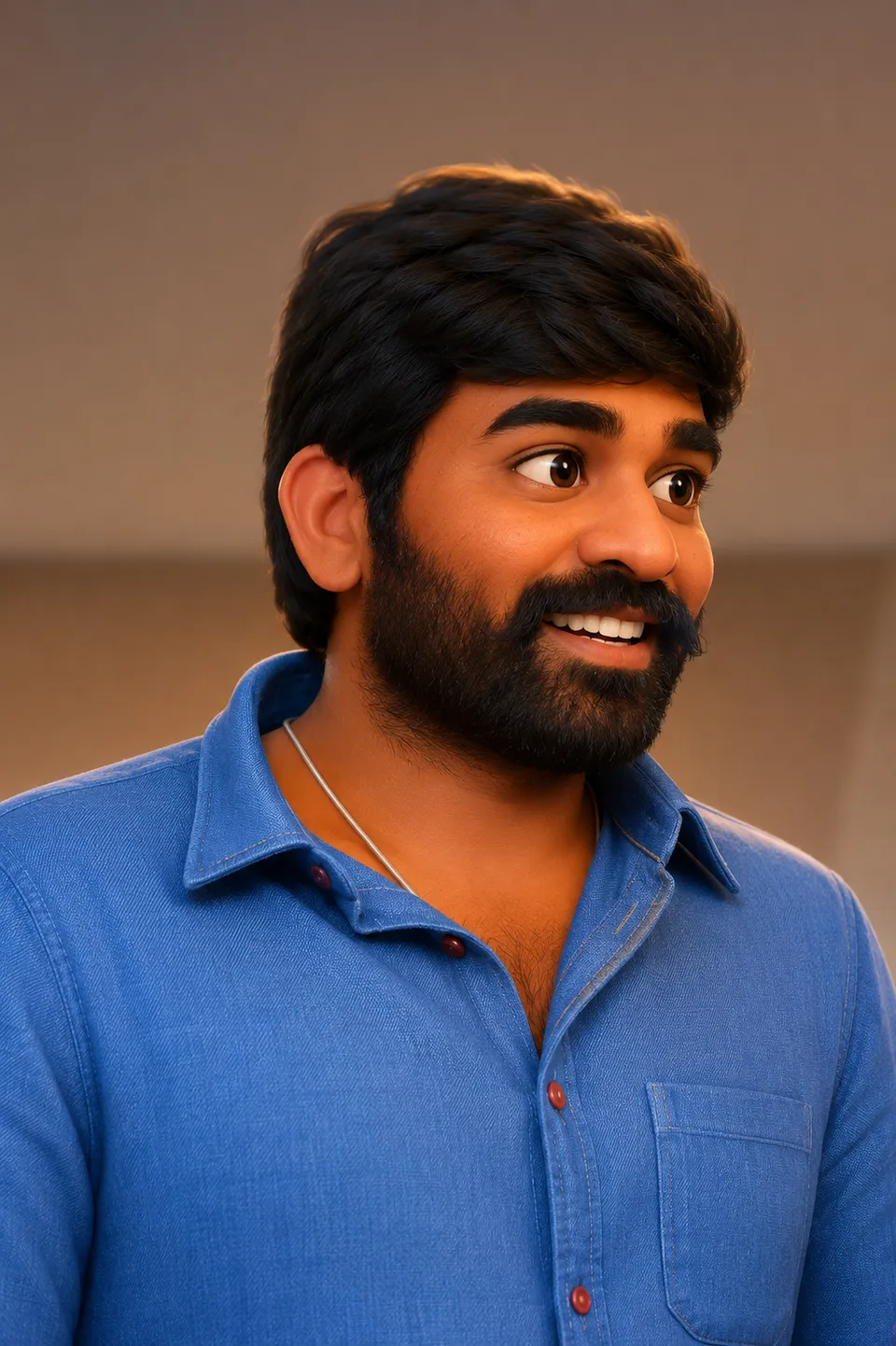
 AI-generated
AI image prompt
Pixar / Disney 3D
Captured in a joyful embrace, a couple radiates warmth in a Pixar-style 3D animated render. The characters retain their recognizable features while showcasing a playful, colorful environment characteristic of beloved animated films.
Transform the uploaded photograph into a PIXAR / DISNEY-style 3D animated character render — re-render the entire image as a polished 3D animation frame.

SUBJECT: the person/people (or pet) in the uploaded photograph.

LIKENESS THROUGH STYLE (mandatory):
- A STYLE TRANSFORMATION: re-render the WHOLE image as a 3D animated frame, but the subject(s) stay RECOGNISABLE — keep facial structure, features, expression, hairstyle, pose, and framing. "That's [them] as a Pixar character."
- Apply the 3D-animation style UNIFORMLY across subject and background — one coherent CGI render.
- Preserve identity cues — face shape, true skin tone in the render's palette, hair, distinguishing features (a mole, glasses, a beard). For couples/groups keep each person DISTINCT; never blend faces.

Pixar 3D style spec:
- Polished 3D-animation render: smooth subsurface-scattered skin with soft pores, slightly stylised rounded features, large expressive eyes with bright catchlights (keep the person's real eye colour), soft full hair rendered in clumped 3D strands.
- The signature appealing-character proportions — a touch larger head and eyes than real, soft rounded jaw — but still clearly THIS person (don't over-cartoon away the likeness).
- Cinematic CGI lighting: soft key light, warm rim light, gentle ambient occlusion, that glossy Pixar "good light" with depth-of-field.
- Background: a clean, slightly stylised 3D environment matching the original setting (or a warm appealing Pixar-style backdrop), softly blurred.
- Colour: vivid, warm, high-quality animation colour grade.

Preserve from the original: the number of people, pose and relative positions, composition/crop, key props, and each person's likeness (face shape, hair, glasses, facial hair).

Output: a single clean 3D-animation-style render, no text, no border, no watermark. Aspect ratio matching the upload (or 4:5).This image was generated with AI.
About this look
The couple's affectionate pose is transformed into a polished 3D animation frame, emphasizing their warmth and connection. With smooth skin textures and rounded features, the characters' large expressive eyes reflect their true eye colors, while the soft key lighting and vibrant background create a whimsical atmosphere. Every detail, from hairstyle to facial expressions, is carefully crafted to maintain their likeness while embracing the distinctive Pixar charm.
Ideal for personal celebrations, this stylized illustration is perfect for anniversaries, engagement announcements, or simply commemorating a special moment together. Sharing this playful render on social media or as part of a digital album brings a touch of animated magic to the occasion, appealing to fans of Disney and Pixar alike. It's especially suited for those who want to celebrate their relationship in a fun, creative way, making it a unique keepsake for couples.
How to use this prompt
Upload a clear photograph of the couple, ensuring their faces and distinguishing features are visible. The prompt will re-render the entire image into a 3D animated style while preserving likeness, including facial structures and expressions. A good result will maintain the original pose and composition, with a polished CGI look. If the likeness appears off, adjusting the clarity or lighting of the uploaded photo may help refine the render.
Tips to customize it
- Adjust the background to a more whimsical Pixar-style setting for added charm.
- Experiment with the couple's clothing colors to match vibrant animation palettes.
- Ensure the lighting in the original photo is warm to enhance the CGI effect.
- Select a portrait orientation (4:5) to best capture the couple's embrace.
More like this

Prompt Deck
Free on Google Play
Take the whole deck with you
Browse thousands of AI image prompts, customise them with your own details, and create — all from the Prompt Deck app.
- Tap to customise & copy
- Save your favourites
- Fresh prompts daily