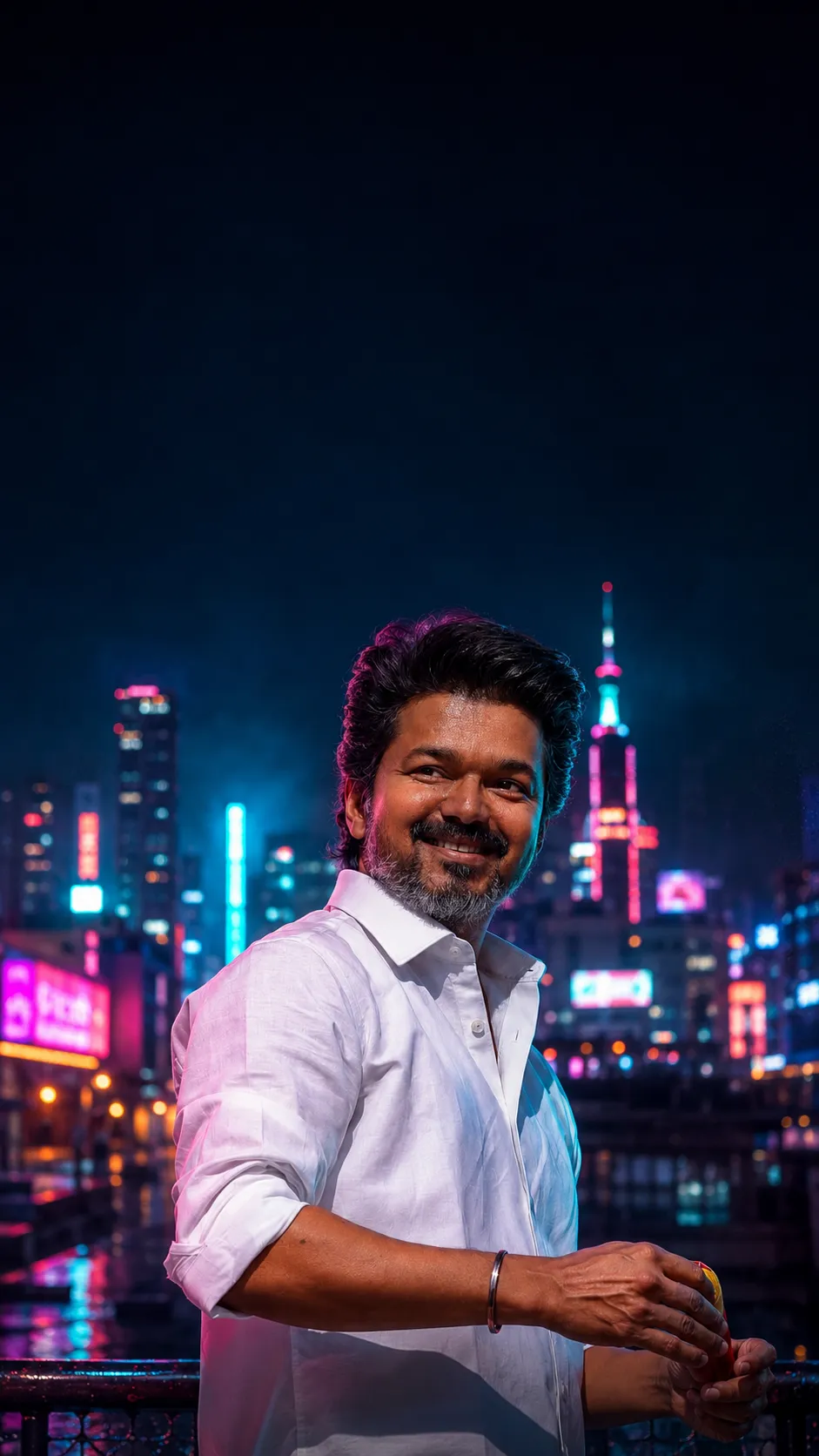
 AI-generated
AI image prompt
Neon City Night Wallpaper
A vibrant blend of saturated neon hues illuminates a cinematic portrait against a blurred urban landscape. The warm key light and cool rim tones create a striking contrast, perfect for a night-time phone wallpaper that captures the essence of city life.
A single 9:16 vertical PHONE LOCK-SCREEN wallpaper: the person from the uploaded photograph against a glowing neon night city, with lock-screen UI in the dark sky.

REALISM (top priority): the person is the real individual from the upload — lock facial structure, features, eye shape/colour, hairline, skin tone, marks; faithful and recognisable. Face/body ONE continuous photograph (no neck seam, no two-tone, face not sharper than the body), RE-LIT by the neon (tinted by light, NEVER lightened), head naturally proportioned. The city is a real believable night cityscape (real buildings, real lights, atmospheric haze), softly out of focus. Compose UI over the dark sky/background, not across the face.

REPLACE from the upload: any jewelry — minimal modern.

Wallpaper portrait: a cinematic night portrait — warm key + teal/magenta neon rim light on the face; behind, a real city skyline as warm-cool bokeh, glowing signs (invented, no real brands), slight rain/haze. Real skin texture, lit by the neon.

CLEAN WALLPAPER — NO BAKED-IN UI: do NOT render any clock, date, status bar, widgets, icons, or home-bar — the phone draws its own LIVE clock/UI on top (baking them in causes duplicates). Leave CALM dark-sky NEGATIVE SPACE in the top third for the phone's real clock; keep the face out of that zone. (Optional preview-mockup only: add faux clock/status/icons to preview the look — a mockup, not the file to set.)

Colour: saturated neon palette (teal, magenta, electric blue) against night; true-to-upload skin (tinted, not lightened).

Output: a neon-city lock-screen wallpaper, 9:16. No watermark.
This image was generated with AI.
About this look
Saturated neon colors, including teal, magenta, and electric blue, envelop the subject, creating a visually stunning effect that highlights the intricate details of the face and body. The warm key light enhances the skin tone, while the neon rim light adds depth and dimension. In the background, a softly out-of-focus city skyline glimmers with atmospheric haze, providing an authentic urban backdrop that complements the portrait beautifully. The thoughtful composition ensures that essential negative space is left at the top for the phone's live clock, maintaining a clean and modern aesthetic.
How to use this prompt
To create this wallpaper, upload a clear photograph of the individual you wish to feature, ensuring their facial features and skin tone are distinct. The prompt requires a vertical 9:16 aspect ratio, with the subject’s face positioned to avoid the top third of the image, which will house the phone's UI. If the output appears too sharp or disjointed, adjust the facial blending settings to achieve a smoother integration with the background.
Tips to customize it
- Experiment with different neon color combinations for a unique look, such as adding hints of purple or green.
- Try adjusting the atmosphere by including light rain or mist for added depth.
- Use a more relaxed expression for the subject to evoke a calm, urban vibe.
- Consider the subject's clothing color to ensure it complements the neon palette.
More like this
Prompt Deck
Free on Google Play
Take the whole deck with you
Browse thousands of AI image prompts, customise them with your own details, and create — all from the Prompt Deck app.
- Tap to customise & copy
- Save your favourites
- Fresh prompts daily