 AI-generated
AI image prompt
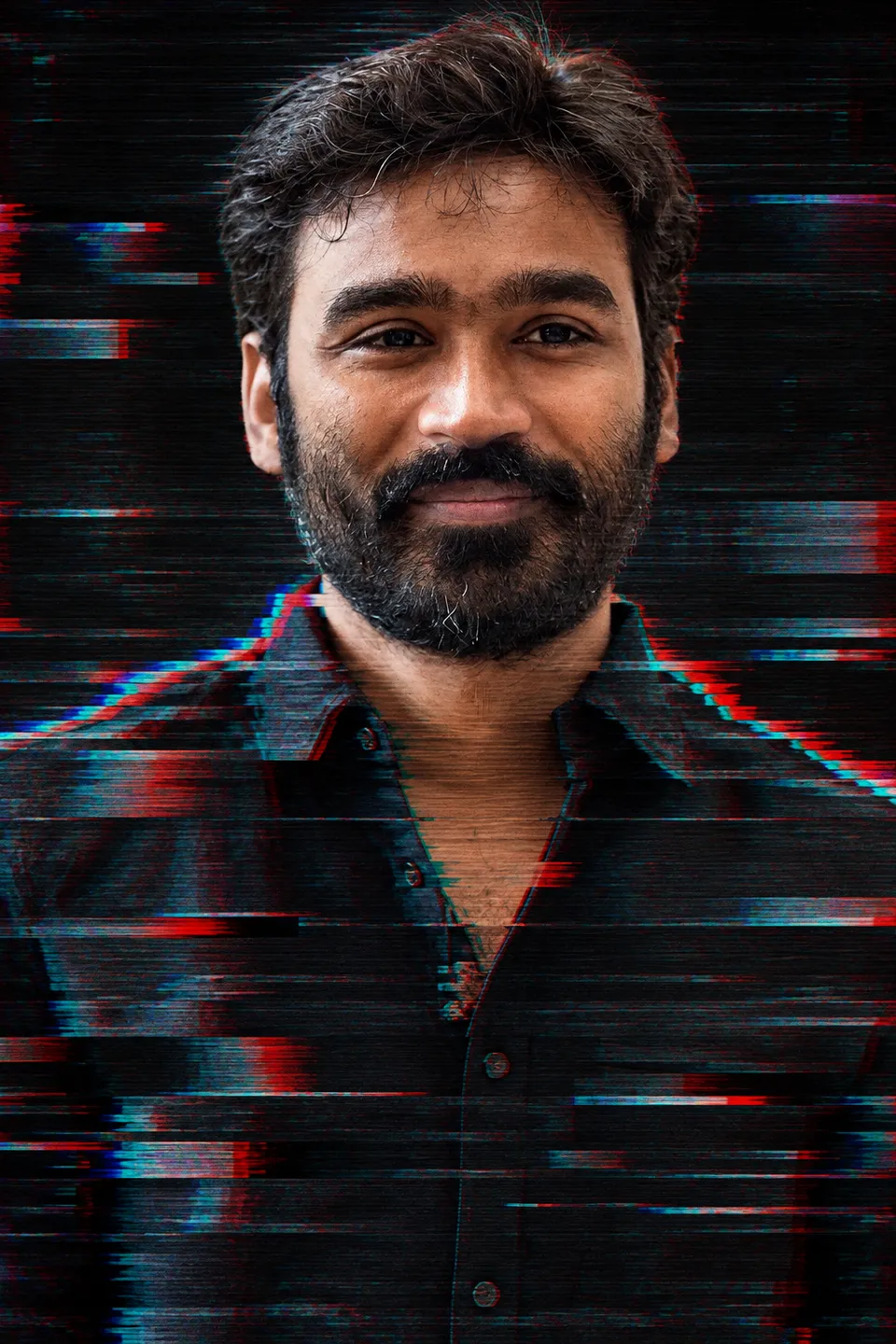
Glitched Portrait Study
A striking portrait featuring a man with a sharp focus on facial features complemented by a digital glitch aesthetic. The image portrays horizontal bands disrupting the background while maintaining clarity on the subject's face.
FACE MATCH FIRST: the exact man in the attached photo - same hairline, brows, eye shape and spacing, nose, lips, jaw, skin tone, same facial hair as the reference. Never beautify or reshape the face.

IDEA: a digital glitch edit - horizontal displacement bands slicing across the frame, RGB channels pulled apart at the band edges, fine scanlines over the whole image, a dark ground.

GUARD: the displacement bands cross the shoulders, chest and background only. One clean unglitched band covers the whole face, which stays sharp and undisplaced. Both eyes stay single, aligned and readable, and no band ever cuts through an eye.

High resolution, clean edges, no artefacts, no duplicated or malformed features. Every face stays sharp and readable at full size. No lettering, numerals or logos anywhere - every label, margin and panel carries plain colour or texture only.

CHECK: every face in the image must match the reference exactly.
This image was generated with AI.
About this look
This artwork achieves a unique combination of realism and abstraction by presenting the man’s face in sharp detail while the background is distorted with horizontal displacement bands. The RGB channels are artfully separated at the edges, giving a pronounced glitch effect, and the clean, unglitched band over the face keeps the features sharp and recognizable. Each element is designed to contrast vividly with the dark backdrop, enhancing the overall impact of the glitch aesthetic.
How to use this prompt
Start with a high-resolution reference photo of the man to ensure a precise face match. Specify the required facial features such as hairline, eye shape, and skin tone. Expect the final output to prioritize a clean, sharp face in a glitch art style, maintaining every detail intact while incorporating displacement bands for contrast. If the final image appears distorted, adjust the displacement band's positioning or intensity to keep the face clear.
Tips to customize it
- Use a dark background to enhance the glitch effect
- Ensure high resolution for facial details
- Adjust displacement band thickness for preferred style
- Limit background elements to emphasize the subject's face
More like this
Prompt Deck
Free on Google Play
Take the whole deck with you
Browse thousands of AI image prompts, customise them with your own details, and create — all from the Prompt Deck app.
- Tap to customise & copy
- Save your favourites
- Fresh prompts daily